
Google Search Console Guide: How to Find SEO Opportunities and Fix Ranking Issues
Google Search Console is one of the most useful free resources available to website owners, marketers, and SEO professionals. It provides direct insights into how Google discovers, crawls, indexes, and displays your website in search results. However, simply connecting Search Console to a website is not enough. The real value comes from understanding the data and turning it into actionable SEO improvements.
A Google Search Console Guide can help businesses identify keywords they are already appearing for, discover pages with untapped ranking potential, investigate sudden traffic declines, and detect indexing problems that could prevent important content from appearing in Google Search.
At ACECLiQ, we use Google Search Console data alongside technical SEO analysis, content optimization, keyword research, and performance monitoring to identify opportunities and create practical strategies for improving organic search visibility.
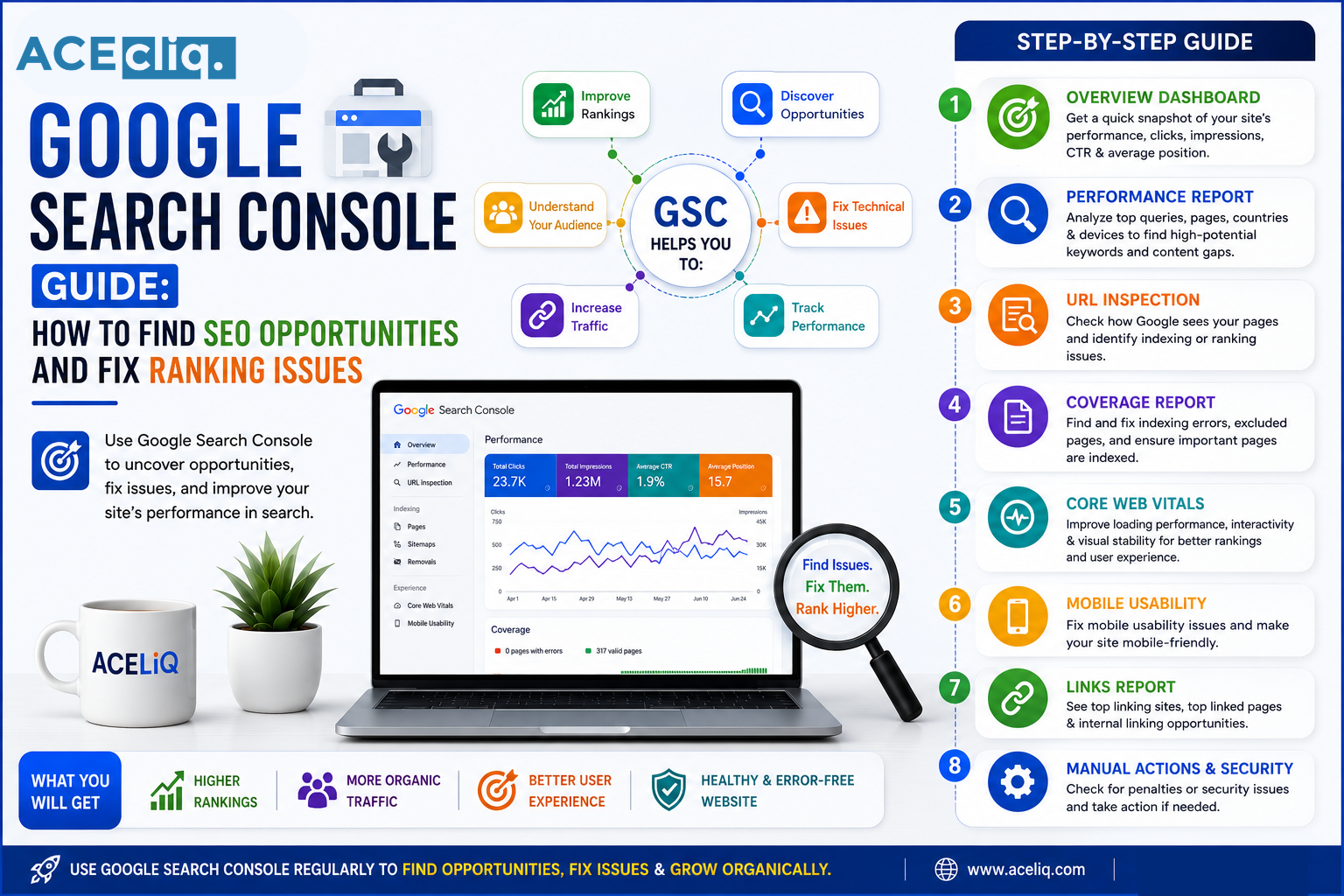
AI Overview
Google Search Console is a free tool that helps website owners understand how their pages perform in Google Search. A Google Search Console Guide can help businesses identify valuable search queries, pages with declining performance, indexing problems, technical issues, and opportunities to improve organic visibility. By analyzing impressions, clicks, click-through rate, average position, indexing reports, URL inspection, Core Web Vitals, and other available reports, businesses can make more informed SEO decisions and fix issues that may prevent important pages from performing well.
What Is Google Search Console?
Google Search Console is a Google service that provides information about a website's performance and presence in Google Search. It can help website owners understand how their pages appear in search results and identify issues affecting crawling and indexing.
The platform provides reports covering areas such as search performance, page indexing, URL inspection, sitemaps, Core Web Vitals, and other search-related information. For SEO professionals, it is particularly valuable because it provides first-party data about how Google Search interacts with a website.
Why Google Search Console Matters for SEO
SEO decisions should be based on evidence rather than assumptions. Search Console can reveal search queries that generate impressions, pages receiving organic clicks, changes in average position, and areas where website performance may be improving or declining.
This information allows businesses to answer important questions.
Which pages are gaining visibility? Which queries are generating impressions but few clicks? Which URLs have indexing problems? Has organic performance changed significantly? These insights can turn Search Console into a practical SEO Performance tool rather than simply a reporting platform.
Understanding the Performance Report
The Performance report is one of the most valuable areas of Search Console.
It provides information such as:
Clicks represent visits to your website from Google Search.
Impressions indicate how often your pages were shown in search results.
CTR represents the percentage of impressions that resulted in clicks.
Average position provides an aggregated indication of where your pages appeared for queries.
Looking at these metrics together provides more useful information than focusing on any single number.
For example, a page receiving many impressions but a low CTR may have an opportunity for improved titles and descriptions.
How to Find New Keyword Opportunities
One of the most valuable uses of Search Console is discovering queries for which your website already receives visibility. Open the Performance report and examine the queries associated with your website. You may discover that a page is appearing for related searches that were not part of your original keyword strategy.
These queries can reveal opportunities to improve existing content.
For example, a blog targeting a broad topic may already receive impressions for several specific questions. Expanding the page to address those questions more clearly can potentially improve its relevance for those searches.
This is a practical way to develop an Organic Traffic Strategy based on actual search data.
How to Identify Ranking Issues
A decline in Google rankings should be investigated systematically. Start by comparing your current performance with an earlier period. Look at clicks, impressions, CTR, and average position. Then determine whether the decline affects the entire website or only specific pages and queries. A site-wide decline may require a broader technical or algorithm-related investigation, while a decline limited to a few pages may indicate content, competition, or page-specific issues. Avoid making major changes before understanding the pattern behind the decline.
Find Pages Losing Organic Traffic
Search Console can help identify pages whose search performance has changed. Compare different time periods and look at individual URLs. If a previously successful page has experienced a significant decline, investigate its queries and average position.
Then review the page itself. Has the information become outdated? Has search intent changed? Are competing pages offering more comprehensive answers? Did the website recently change its URL structure or internal links? Combining Search Console data with a broader SEO Analysis can help identify the likely cause.
Fix Indexing Problems
A page cannot generate organic traffic if Google cannot properly index it. The Page Indexing report helps website owners understand how URLs are being handled by Google's systems.
Potential issues may involve:
- Pages excluded from indexing
- Redirect problems
- Server errors
- Duplicate URLs
- Canonicalization issues
- Crawling-related problems
Not every excluded URL is a problem. Some pages are intentionally excluded, such as duplicate or administrative pages. The goal is to ensure that your important, indexable pages are accessible and correctly represented.
Use the URL Inspection Tool
The URL Inspection Tool allows you to examine how Google sees a specific URL. It can be particularly useful when a newly published or updated page does not appear in search results as expected. You can use it to investigate indexing status and inspect information associated with the URL. For SEO teams, this makes it easier to troubleshoot individual pages rather than relying only on website-wide reports.
Monitor Core Web Vitals
Website experience remains an important part of modern SEO. Search Console's Core Web Vitals report provides information about how URLs perform against Google's user-experience metrics. These metrics focus on loading performance, responsiveness, and visual stability. If important pages consistently demonstrate poor performance, businesses should investigate factors such as large images, unnecessary scripts, inefficient code, hosting performance, and layout instability. Improving page experience can benefit both users and overall website performance.
Check Your Sitemap
An XML sitemap helps search engines discover important URLs on your website. Search Console allows website owners to submit and monitor sitemaps. Your sitemap should contain the canonical URLs that you want Google to discover and potentially index. It should not be treated as a replacement for internal linking or crawlable website architecture. Instead, a sitemap should work alongside a technically sound website structure.
Improve Click-Through Rate
A page can receive thousands of impressions without generating significant traffic if users do not click the search result.
Search Console can help identify these opportunities.
Look for pages with relatively high impressions but low CTR.
Then evaluate whether the title and description accurately communicate the value of the page.
A stronger search snippet can encourage more qualified users to visit your website.
However, titles and descriptions should accurately represent the content rather than using misleading clickbait.
Discover Content Optimization Opportunities
Search Console data can help you identify pages that are close to stronger rankings. Suppose an important page is already receiving impressions for several relevant queries but consistently appears below the strongest results. Instead of immediately creating another page, evaluate whether the existing resource can be improved.
You might strengthen its explanation, address missing subtopics, improve internal links, update outdated information, or better align the content with search intent. This approach can make existing content more valuable while reducing unnecessary content production.
Combine Search Console With Other SEO Data
The Search Console is powerful, but it should not be used in isolation. Combine its data with analytics, technical crawling tools, keyword research platforms, backlink analysis, and business conversion data.
For example, Search Console can tell you that a page is generating organic clicks, while analytics can help you understand what visitors do after arriving. Similarly, ranking tools can provide additional competitive insights, while technical crawlers can uncover website issues.
Combining multiple data sources creates a more complete SEO Performance Analysis.
Common Google Search Console Mistakes
One common mistake is checking Search Console only when rankings fall. Regular monitoring makes it easier to identify changes early. Another mistake is focusing exclusively on average position. This metric is useful, but it does not tell the complete story. Businesses should also avoid treating every indexing exclusion as an error or requesting indexing repeatedly without fixing the underlying issue.
Finally, do not optimize solely for impressions and clicks. The ultimate objective should be attracting relevant visitors who contribute to meaningful business outcomes.
How Often Should You Check Search Console?
The ideal frequency depends on the size and activity of your website.
For an active business website, checking performance at least monthly can provide useful trend information. Larger websites, ecommerce platforms, publishers, and sites undergoing significant changes may benefit from more frequent monitoring. Technical issues should be investigated whenever they appear rather than waiting for a scheduled monthly review.
Consistent monitoring makes SEO more proactive and less reactive.
Final Conclusion
Google Search Console is much more than a tool for checking whether your website is appearing on Google. When used correctly, it can reveal valuable keyword opportunities, identify declining pages, uncover indexing problems, highlight technical concerns, and guide content optimization.
The key is to interpret the data within the context of your overall SEO strategy.
At ACECLiQ, we use Google Search Console insights to support Technical SEO audits, content optimization, keyword strategy, ranking analysis, and organic growth initiatives. By turning search data into actionable decisions, businesses can identify new opportunities, resolve ranking issues, and build a stronger foundation for sustainable search visibility.